
WebSite - ISP Info
📘 Overview
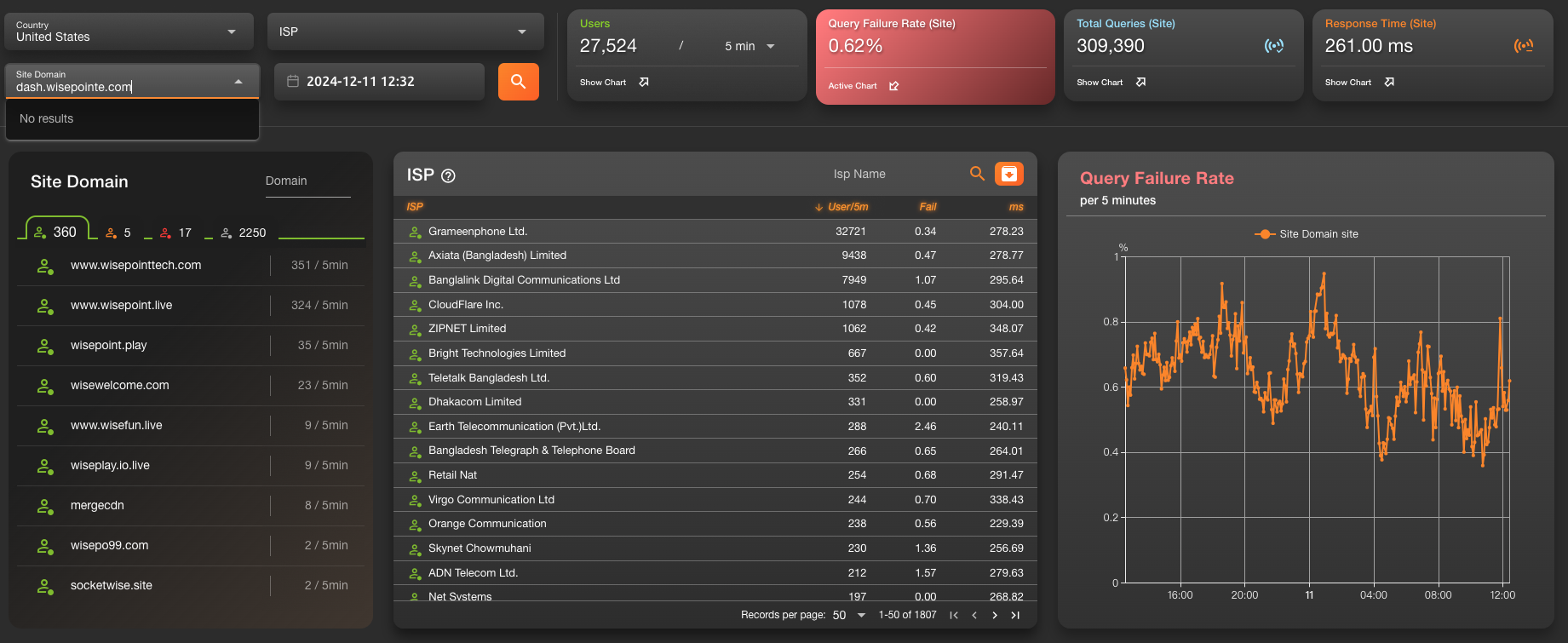
The ISP Info page is similar to Project Info, but focuses on network quality and traffic insights from a country and city perspective.
It allows you to analyze how different ISPs perform when connecting to domains in specific regions.
This page is a key tool for diagnosing regional connection issues and evaluating network distribution.
Users can start by selecting a country or city and then view domain and ISP connection data.
Available information includes:
- Top domains by user volume in the selected region (default: highest-traffic country)
- ISP-level statistics
- Connection health indicators between ISPs and domains
This makes it easy to identify anomalies and traffic patterns.
🧭 Feature Breakdown
1. Regional Filters
- Country Selector: Displays all ISPs and their usage within the selected country.
- City Selector (if available): Further narrows the analysis to a specific city or region.
2. ISP Overview Table (Bottom Section)
- Once a country is selected, the table below loads ISP user and status data automatically.
- ISPs are sorted by number of users in descending order, helping you quickly spot major providers.
3. ISP-to-Domain Monitoring
The table includes a list of the top domains with the highest number of users in the selected country.
Each domain is marked with a color-coded health indicator:
- 🟢 Green: Normal
- 🟡 Yellow: Warning (minor issues)
- 🔴 Red: Critical issue
- ⚪ Gray: No data or inactive
📊 Table Column Descriptions
| Column Name | Description |
|---|---|
| Top Domain Status | The most accessed domain for the ISP, shown with a color-coded status |
| ISP | Internet service provider name |
| User/5m | Number of active connections from this ISP (sorted descending) |
| Fail | Failure rate for this ISP (sorted descending) |
| ms | Average response time for requests via this ISP (if available) |
🔍 Usage Scenarios
1. Diagnose Regional Issues
- If users report instability in a specific country or region, this page helps identify problematic ISPs or domains quickly.
2. ISP Comparison & Diagnosis
- If multiple ISPs serve the same domain but only one shows poor performance, it likely indicates a regional ISP issue.
Useful for support teams when working with network providers.
3. Strategic Planning
- Long-term monitoring of ISP stability can guide business decisions, such as selecting CDN nodes or regional service deployment strategies.